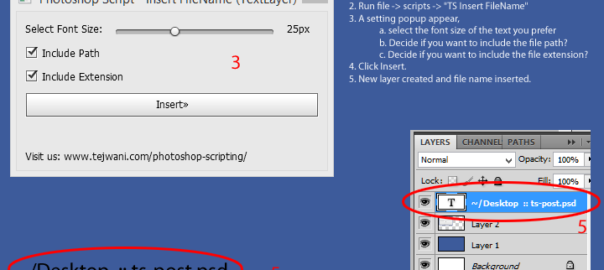
Hey guys, we have just created a small utility/tool/photoshop-script which will come in handy to you guys. Its called Insert Current Filename.
Its a Photoshop Script that basically inserts current file-name into a new layer (top of the heap) of the current file. So if you ever need a script, which on click of a button would add your filename into a text layer within the psd file, this script will be handy for you.
How to Install “Insert Current Filename”:
- Download the ZIP file by clicking here. (~4kb)
- Extract to a temp location
- Copy two files “TS Insert FileName.jsx” and “TS-insert-filename.html” to “Adobe Photoshop CS#/Presets/Scripts/” folder
- This step will need Admin privileges
- *** Make sure to copy both files as mentioned above. ***
How to Run this photoshop script:
- Restart Photoshop
– file -> script should now have an new option of “TS Insert FileName” - Open any image file
- Run file -> scripts -> “TS Insert FileName”
- A setting popup appear
- select the font size of the text you prefer
- Decide if you want to include the file path?
- Decide if you want to include the file extension?
- Click Insert.
Insert Current Filename script tested in:
1. Windows/Photoshop CS5
It would be great if you guys can give me your feedback on the script, like your PS version, did it work or had any issue, etc.
Hello
I downloaded this script. Thank You. I want to exclude the file path and the file extension. Can I automate this phase also?
Sorry, that cant be done with the current script.
You need to edit the adobe script file…
Open it with Notepad and change
“incPath: Checkbox { text:’Include Path’, value: true }” to value:false
and
“incExt: Checkbox { text:’Include Extension’, value: true}” to value: false.
I hope it helps somehow (that way when on Action you will only need to press ‘Enter’ and you will get the FileName without the path or extension.
SIR I REQUEST YOU, HOW TO INSERT MY STUDIO NAME , FILE NAME AND CURRENT DATE PLEAE THIS ONE SCRIPT ALSO MAKING SIR FOR PHOTOSHOP CS3
Hi, Thanks for your message.
This Script adds only the filename, you will need a custom solution for your case.
This script will work fine for CS6 onwards. CS3 is too old, consider upgrading your version.
Regards
Anil
Sir i have photoshop cs6 i expect in print Studio name ,date & file name
Brilliant. Thanks! Even works in PS CC 2017.
Not so helpful in batching if you want to walk away…
Thanks! even works in CC2021
Great!
Anil, would you modify the script for a PayPal donation? Example, add a white background to filename text field to see the filename appear clearly in every photo; add 4 preset locations for the filename text field to appear; and, add batching capability?
Great script. Is there a way to automate the “insert” button so that the script can work in a batch process? Thanks.
Great script. Is there a way to update it so that the insert button defaults to yes? That was it could be used in a batch process.
Perfect script! I add it in long Action, change default settings, but can’t go away. I need to press Enter every 10 sec. What needs to be changed in it so as not to press Enter every time?
Thanks!! It works well on Mac. I wanna align the text(filename) to right. What do I have to change?
Its work with PS2020, many thanks!